Web Scraping vs Web Crawling: What's the Difference and When to Use Each
See the 4-question test for web scraping vs web crawling—frontier vs pipeline explained, with Python examples and a decision framework.
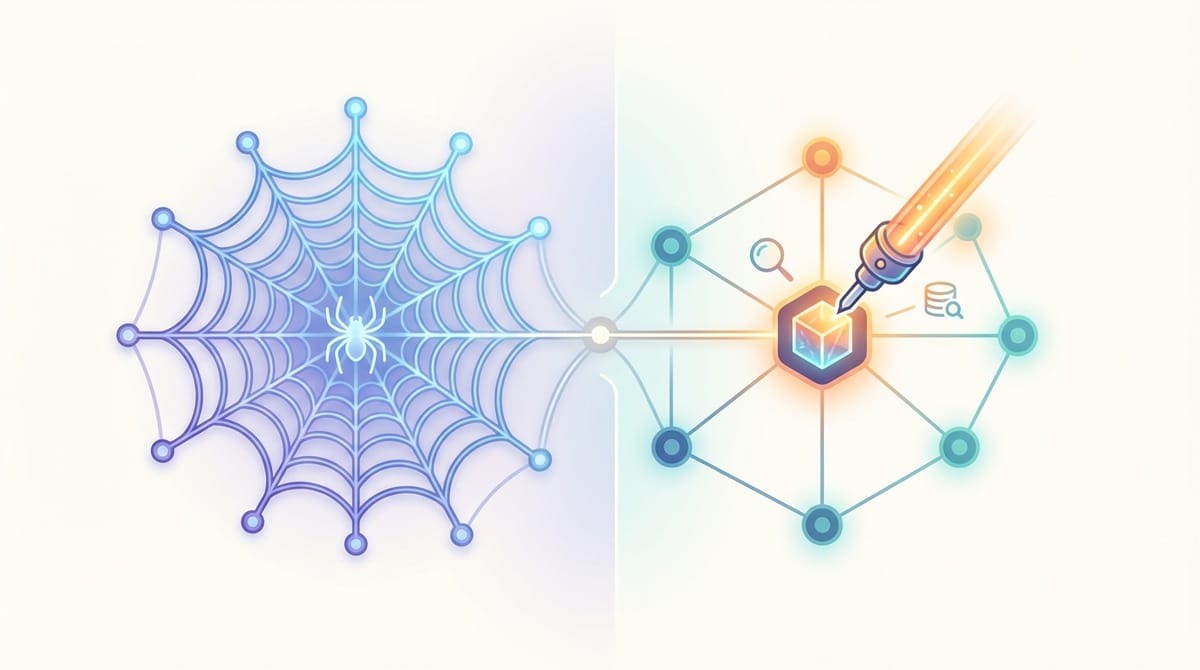
Web scraping vs web crawling comes down to one thing: crawling discovers pages; scraping extracts data from them. One manages a URL frontier. The other manages a data pipeline. Pick wrong and you build the wrong system.
This matters more now than two years ago. Automated bot traffic hit 51% of all web traffic in 2024 (Imperva 2025 Bad Bot Report). GIVT rates nearly doubled—86% YoY increase in H2 2024—driven by AI crawlers and scrapers (DoubleVerify). Your architecture choice must account for a structurally different web.This guide delivers a system-design mental model (Frontier vs Pipeline), side-by-side Python examples, and a decision framework covering crawling, scraping, and semantic crawling for AI/RAG.
At a glance: Crawl → URLs (discovery) | Scrape → structured records (extraction) | Semantic crawl → chunks/vectors (retrieval-ready)
Quick Answer: What's the Difference Between Web Crawling and Web Scraping?
Web crawling discovers pages by following links and managing a URL frontier: scheduling, deduplicating, prioritizing visits. Web scraping extracts structured data through a parsing pipeline: selecting fields, validating, storing records. A crawler outputs URLs; a scraper outputs structured data. Most production projects combine both: crawling to discover pages, then scraping to extract records.
What is web crawling? Automated discovery and traversal of web pages. A crawler starts from seed URLs, follows links, deduplicates, schedules visits, and respects rate limits. Output: URL set, link graph, or index candidates.
What is web scraping? Automated extraction of specific data from web pages. A scraper targets known URLs, fetches HTML or rendered DOM, parses fields, validates, and stores records. Output: JSON, CSV, or database rows.
The "vs" framing is misleading—crawling and scraping are stages in the same workflow, not competing choices.
The System-Design Model: Crawler = Frontier, Scraper = Pipeline
Defining crawling as "finding URLs" and scraping as "extracting data" is accurate but not actionable. The real question: what primary state does your system manage?
How Web Crawling Works: Frontier Management
A crawler decides what to visit, in what order, without wasting resources.
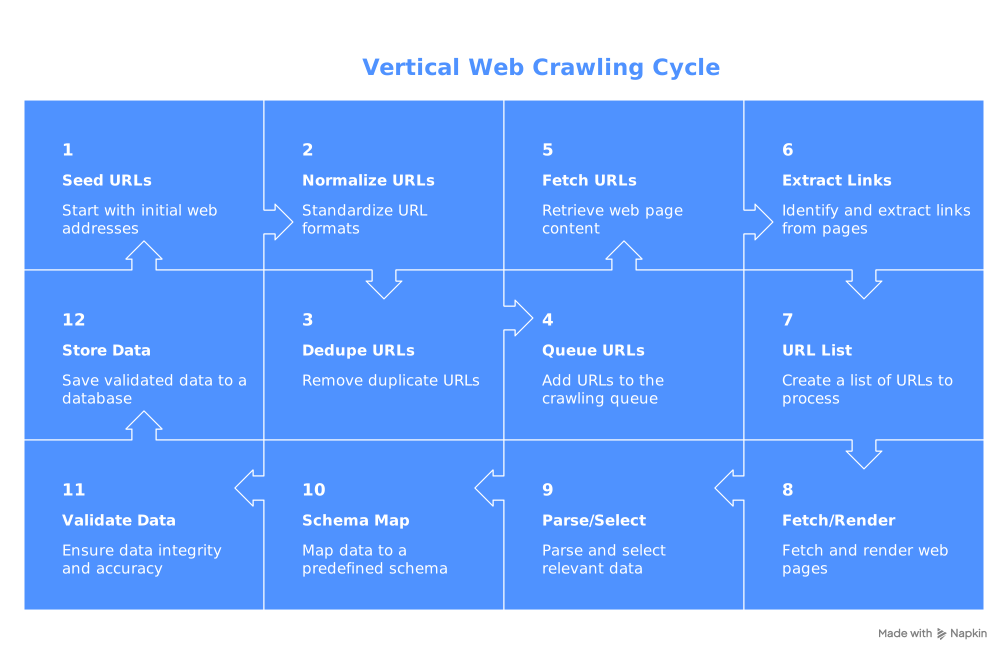
Core components: URL normalization → deduplication (seen set) → queue/frontier → prioritization → retries and error handling.
Inputs: Seed URLs, domain rules, depth limits, rate budgets.
Outputs: URL list, link graph, index candidates, crawl logs.
Most teams aren't building Google—they're crawling bounded domains to find pages worth scraping.
How Web Scraping Works: Extraction Pipeline
A scraper turns HTML into clean, validated records.
Core components: Fetch/render → parse/select (CSS selectors, XPath) → schema mapping → validation → storage.
Inputs: Known URLs (from crawl, sitemap, API, or manual list).
Outputs: Structured records plus extraction metadata (timestamps, source URLs, parse errors).
Crawler vs Scraper Failure Modes
Understanding failures reveals why these are different engineering problems:
| Crawler failures | Scraper failures | |
|---|---|---|
| Common | URL explosions, redirect loops, spider traps, rate-limit bans, frontier bloat | Selector drift, JS rendering gaps, schema mismatches, silently missing fields |
| Key metric | Pages attempted vs succeeded, dedupe rate, ban rate | Parse success rate, validation failures, field completeness |
Key Takeaway: Deduplication prevents wasted crawl budget. Validation prevents dirty datasets. Design for both from day one.
Web Crawler vs Web Scraper in Python: Side-by-Side Examples
Code clarifies what definitions can't.
Minimal Crawler (Frontier + Dedupe + Politeness)
import requests

def crawl_with_olostep(start_url, max_pages=50):
    """
    Crawl a website using Olostep's /v1/crawls endpoint.

    Olostep handles:
    - Frontier management (deduplication, scheduling)
    - Politeness (rate limiting, delays)
    - JavaScript rendering
    - Domain scoping
    """
    endpoint = "https://api.olostep.com/v1/crawls"
    headers = {
        "Authorization": "Bearer <YOUR_API_KEY>",
        "Content-Type": "application/json"
    }

    payload = {
        "start_url": start_url,
        "include_urls": ["/**"],  # Crawl all URLs on same domain
        "max_pages": max_pages
    }

    # Start the crawl
    response = requests.post(endpoint, json=payload, headers=headers)
    response.raise_for_status()
    crawl_data = response.json()
    crawl_id = crawl_data["id"]

    print(f"Crawl started: {crawl_id}")
    print(f"Start URL: {crawl_data['start_url']}")

    # Check status and retrieve results
    status_url = f"{endpoint}/{crawl_id}"
    while True:
        status_response = requests.get(status_url, headers=headers)
        status = status_response.json()["status"]

        if status == "completed":
            break
        print(f"Status: {status}... checking again in 10s")
        time.sleep(10)

    # Get discovered URLs
    pages_url = f"{endpoint}/{crawl_id}/pages"
    pages_response = requests.get(pages_url, headers=headers)
    pages = pages_response.json()

    discovered = [page["url"] for page in pages["data"]]
    print(f"Discovered {len(discovered)} pages")

    return discovered
The deque is the frontier; seen prevents revisits; time.sleep enforces politeness; domain scoping keeps the crawler on-target.
Minimal Scraper (Extract + Validate)
import requests
import json

def scrape_product_with_olostep(url):
    """
    Scrape a product page using Olostep's /v1/scrapes endpoint
    with LLM extraction for structured data.

    Olostep handles:
    - JavaScript rendering
    - Schema validation
    - Type coercion
    - Field extraction
    """
    endpoint = "https://api.olostep.com/v1/scrapes"
    headers = {
        "Authorization": "Bearer <YOUR_API_KEY>",
        "Content-Type": "application/json"
    }

    payload = {
        "url_to_scrape": url,
        "formats": ["json"],
        "llm_extract": {
            "schema": {
                "product": {
                    "type": "object",
                    "properties": {
                        "title": {"type": "string"},
                        "price": {"type": "number"},
                        "sku": {"type": "string"},
                        "in_stock": {"type": "boolean"}
                    },
                    "required": ["title", "price"]
                }
            }
        }
    }

    response = requests.post(endpoint, json=payload, headers=headers)
    response.raise_for_status()
    result = response.json()

    # Parse the JSON content (returned as string)
    json_content = json.loads(result["result"]["json_content"])
    product = json_content.get("product", {})

    # Validate required fields
    missing = [f for f in ["title", "price"] if not product.get(f)]
    if missing:
        raise ValueError(f"Missing required fields {missing} at {url}")

    product["source_url"] = url
    return product

# Alternative: Using a Parser for deterministic extraction at scale
def scrape_product_with_parser(url, parser_id):
    """
    Use a pre-built or custom Olostep Parser for consistent,
    production-grade extraction.
    """
    endpoint = "https://api.olostep.com/v1/scrapes"
    headers = {
        "Authorization": "Bearer <YOUR_API_KEY>",
        "Content-Type": "application/json"
    }

    payload = {
        "url_to_scrape": url,
        "formats": ["json"],
        "parser": {
            "id": parser_id  # e.g., "@olostep/amazon-product"
        }
    }

    response = requests.post(endpoint, json=payload, headers=headers)
    response.raise_for_status()
    result = response.json()

    json_content = json.loads(result["result"]["json_content"])
    return json_content
Selector config separated from logic for versioning. Schema mapping converts raw text to typed fields. Validation catches missing data before it hits your database.
Hybrid Vertical Crawler: The Real-World Pattern
Most teams do vertical crawling: crawl listings to discover detail URLs, then scrape records from each.
import requests
import json
import time

def vertical_crawl_and_scrape_with_olostep(start_url, url_pattern="/product/", max_pages=200):
    """
    Complete vertical crawling workflow using Olostep:
    1. Crawl to discover URLs
    2. Filter for target pages
    3. Batch scrape for structured data

    This handles the most common production pattern end-to-end.
    """
    headers = {
        "Authorization": "Bearer <YOUR_API_KEY>",
        "Content-Type": "application/json"
    }

    # Step 1: Crawl to discover URLs
    crawl_endpoint = "https://api.olostep.com/v1/crawls"
    crawl_payload = {
        "start_url": start_url,
        "include_urls": ["/**"],
        "max_pages": max_pages
    }

    crawl_response = requests.post(crawl_endpoint, json=crawl_payload, headers=headers)
    crawl_response.raise_for_status()
    crawl_id = crawl_response.json()["id"]

    # Wait for crawl completion
    while True:
        status_response = requests.get(
            f"{crawl_endpoint}/{crawl_id}",
            headers=headers
        )
        status = status_response.json()["status"]
        if status == "completed":
            break
        print(f"Crawling... {status}")
        time.sleep(10)

    # Get discovered URLs
    pages_response = requests.get(
        f"{crawl_endpoint}/{crawl_id}/pages",
        headers=headers
    )
    all_urls = [page["url"] for page in pages_response.json()["data"]]

    # Step 2: Filter for detail pages
    detail_urls = [u for u in all_urls if url_pattern in u]
    print(f"Found {len(detail_urls)} detail pages to scrape")

    # Step 3: Batch scrape with structured extraction
    batch_endpoint = "https://api.olostep.com/v1/batches"
    batch_items = [
        {"custom_id": str(i), "url": url}
        for i, url in enumerate(detail_urls)
    ]

    batch_payload = {
        "items": batch_items,
        "formats": ["json"],
        "llm_extract": {
            "schema": {
                "product": {
                    "type": "object",
                    "properties": {
                        "title": {"type": "string"},
                        "price": {"type": "number"},
                        "sku": {"type": "string"}
                    }
                }
            }
        }
    }

    batch_response = requests.post(batch_endpoint, json=batch_payload, headers=headers)
    batch_response.raise_for_status()
    batch_id = batch_response.json()["id"]

    # Wait for batch completion
    while True:
        status_response = requests.get(
            f"{batch_endpoint}/{batch_id}",
            headers=headers
        )
        status_data = status_response.json()
        if status_data["status"] == "completed":
            break
        print(f"Scraping... {status_data['processed']}/{status_data['total']} pages")
        time.sleep(30)

    # Retrieve results
    results_response = requests.get(
        f"{batch_endpoint}/{batch_id}/results",
        headers=headers
    )

    records = []
    for item in results_response.json()["data"]:
        try:
            json_content = json.loads(item["result"]["json_content"])
            product = json_content.get("product", {})
            product["source_url"] = item["url"]
            records.append(product)
        except (json.JSONDecodeError, KeyError) as e:
            print(f"Extraction failed for {item.get('url')}: {e}")

    return records
This three-stage workflow (crawl → filter → batch scrape) handles 10,000+ URLs efficiently. Olostep's Batch API parallelizes up to 100K requests, completing in minutes what would take hours with sequential requests. The batching also includes automatic retries, progress tracking, and result persistence for 7 days.
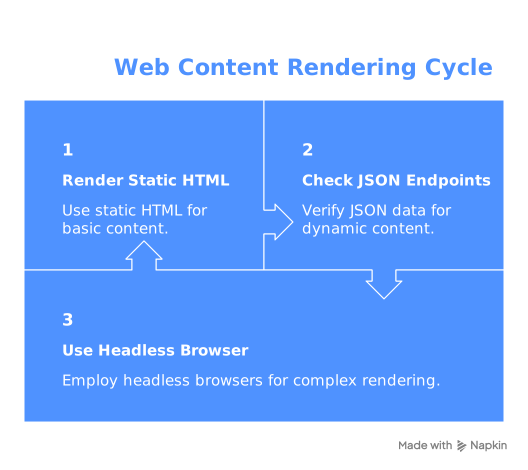
Rendering Strategy: The Cost Ladder
When pages render content client-side, escalate only as needed:
- Static HTML —
requests.get(). Fastest, cheapest (~$0.00001/page compute). Always start here. - JSON endpoints — Many SPAs load from internal APIs. Check the Network tab in DevTools before reaching for a browser.
- Headless browser — Playwright/Puppeteer. Last resort. Roughly 10–50x more expensive per page (~$0.001–0.01) and a larger fingerprint surface. (Crawlee, ScrapeOps)
Spend 30 minutes checking for static HTML or JSON endpoints before spinning up browser infrastructure.
If you'd rather skip managing frontier logic and rendering, Olostep's APIs handle URL discovery, JavaScript rendering, and rate limiting as a service.
Using Olostep API for Production Workflows
While the Python examples above demonstrate core concepts, production teams typically use managed APIs to eliminate infrastructure complexity.
The Olostep Approach
Olostep provides dedicated endpoints that match the crawl/scrape mental model:
Scrape endpoint (/v1/scrapes) — Extract data from a single URL
- Returns markdown, HTML, JSON, or text
- Handles JavaScript rendering automatically
- Supports LLM extraction or self-healing Parsers for structured data
- Cost: 1 credit per page (20 credits with LLM extraction)
Crawl endpoint (/v1/crawls) — Discover URLs across a domain
- Manages frontier, deduplication, and rate limiting
- Returns discovered URLs and page metadata
- Respects robots.txt and domain boundaries
- Cost: 1 credit per page crawled
Batch endpoint (/v1/batches) — Process thousands of URLs
- Parallelizes up to 100K requests
- Completes in 5-7 minutes for 10K URLs
- Includes retries and progress tracking
- Results stored for 7 days
Map endpoint (/v1/maps) — Generate complete sitemaps
- Returns all URLs on a domain
- Useful for site audits and index verification
Quick Start: Scraping with Olostep
Python example using the SDK:
from olostep import OlostepClient

client = OlostepClient(api_key="YOUR_API_KEY")

# Scrape a single page
result = await client.scrape("https://example.com/product")
print(result.markdown_content)

# Batch scrape with structured extraction
batch = await client.batch(
    urls=["https://site1.com", "https://site2.com"],
    formats=["json"],
    llm_extract={
        "schema": {
            "title": {"type": "string"},
            "price": {"type": "number"}
        }
    }
)

# Wait for completion and get results
await batch.wait_till_done()
async for result in batch.results():
    print(result.json_content)
When to Use Olostep vs DIY
| Factor | DIY Python | Olostep API |
|---|---|---|
| Setup time | Hours (for prototype) | Minutes |
| Maintenance | Ongoing selector updates, proxy management | Zero — Parsers self-heal |
| JavaScript rendering | Requires headless browser setup ($0.001–0.01/page) | Automatic (included in 1 credit) |
| Rate limiting | You implement | Handled automatically |
| Batch processing | Sequential or manual parallelization | Up to 100K concurrent |
| Low-volume cost | Lower (~$0.00001/page) | Higher (1 credit = ~$0.001) |
| High-volume cost | Often higher (proxies, infrastructure) | Predictable per-credit pricing |
| Best for | Single-site, static content, learning | Multi-site, production, scale |
The crossover: Most teams switch to managed APIs when they need JavaScript rendering, maintain 3+ target sites, or exceed 10K pages/month. Get 500 free credits to test the API on your use case.
When to Use Crawling vs Scraping: Decision Framework
Anchor your decision to output, not tools.
| Goal | Output needed | Approach | Example use cases |
|---|---|---|---|
| Site audit, link mapping | URL graph, broken links | Crawl | SEO audits, sitemap verification, change detection |
| Known pages → structured data | Rows/records (JSON, CSV) | Scrape | Price monitoring, job aggregation, lead enrichment |
| Large/unknown site → entities | Records from many pages | Vertical crawl + scrape | E-commerce catalogs, real estate listings |
| RAG, agent browsing | Chunks, markdown, vectors | Semantic crawl | Knowledge base ingestion, AI agent tool-use |
| Website indexing | Index candidates + metadata | Crawl | Search engine crawlers, internal search |
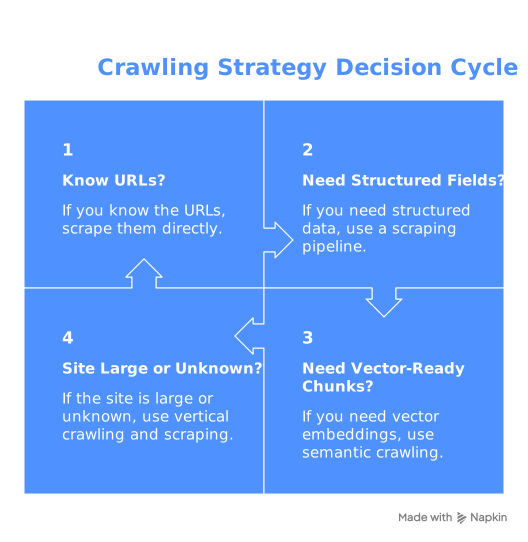
Decision flow:
- Already know which URLs to extract? → Scrape.
- Need structured fields (price, name, date)? → Scraping pipeline.
- Need vector-ready chunks for retrieval? → Semantic crawl.
- Site large or unknown? → Vertical crawl + scrape.
Semantic Crawling: The Third Category for AI Workflows
Semantic crawling traverses pages like a crawler but outputs clean markdown, text chunks, or embeddings instead of structured records. It serves RAG pipelines, AI agents, and knowledge base ingestion—workflows where a language model consumes the output rather than a database table.
Tools like Firecrawl and Jina Reader target this workflow, signaling a distinct category beyond the traditional crawl-vs-scrape binary.
Blocks, Robots.txt, and the Closing Web
Plan for these constraints from your first architecture sketch.
Why Basic Requests Fail at Scale
Bot detection systems (Cloudflare, Akamai, DataDome) fingerprint TLS signatures, header patterns, and behavioral signals. Rate limiting is aggressive. JS-dependent rendering means fetched HTML may contain zero content.
What works: Reduce volume (cache, dedupe, incremental recrawls). Respect declared limits and 429 responses. Use official APIs when available. Consider managed solutions for proxy rotation and rendering.
Robots.txt: Signal, Not Shield
TollBit's data shows AI bots bypassing robots.txt increased over 40% in late 2024, with millions of scrapes violating restrictions. Publishers respond with more frequent robots.txt updates blocking AI crawlers by user-agent.
Still respect robots.txt—violation creates legal exposure. But don't assume others do. That asymmetry drives publishers toward aggressive technical countermeasures.
The Pay-Per-Crawl Shift
Cloudflare launched an "easy button" to block all AI bots, available to all customers including free tier. Over one million customers opted in. Cloudflare now blocks AI crawlers accessing content without permission by default.
For pipeline teams: access reliability will decrease for unmanaged setups. Pay-per-crawl and licensed data access are becoming standard.
Key Takeaway: Treat access as a constraint, not an afterthought. Budget for blocks, retries, and rendering costs from day one.
Data Quality for AI: Preventing Contaminated Datasets
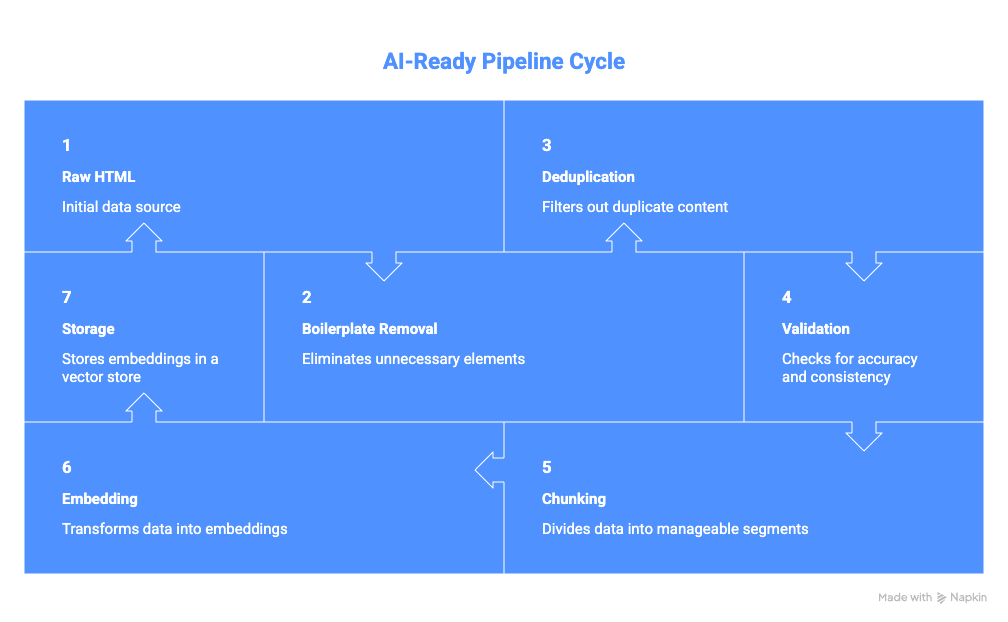
Scraping at scale without quality controls produces actively harmful data for AI applications.
Shumailov et al. (Nature, 2024) showed that training on scraped AI-generated content can collapse model output diversity. If your pipeline ingests synthetic content and feeds it into training or RAG, you amplify noise downstream.
Store with every record: source URL, fetch timestamp, raw snapshot reference, extractor version, parsing errors.
Sanitize before ML or RAG:
- Strip boilerplate (nav, footers, ads, cookie banners)
- Deduplicate at document and near-duplicate level
- Filter unexpected languages
- Validate schema (reject records outside expected types/ranges)
- Apply AI-content heuristics (signal, not verdict)
RAG-specific: Chunk at semantic boundaries. Convert to markdown before chunking. Attach source URL and timestamp as retrieval metadata.
Dynamic Sites and SPAs
SPAs change crawling more than scraping. Once you have the rendered DOM, extraction works identically. Discovery is what breaks.
What breaks: Infinite scroll replaces pagination links. Client-side routing hides URLs from raw HTML. Some SPAs serve everything from a single URL. Navigation may require interaction sequences.
Cheaper discovery methods (before headless):
- XML sitemaps — many SPAs generate them for SEO; check
/sitemap.xml - Internal search APIs — backends often return URLs directly
- Pagination parameters —
?page=Noroffset=Npatterns - Canonical tags —
<link rel="canonical">in server-rendered HTML - RSS/Atom feeds — still available on many content sites
When none work, scope headless rendering tightly: render listing pages for link extraction, fetch detail pages statically when possible.
Compliance Essentials
Practical guidance, not legal advice.
- Review Terms of Service for automated access prohibitions
- Respect robots.txt,
<meta name="robots">,X-Robots-Tag - Implement rate limiting below site-degradation thresholds
- Handle PII with appropriate protection measures
- Assess copyright (research vs. redistribution vs. model training differ significantly)
- Maintain data lineage: what, when, where, how processed
- Define retention/deletion policies; provide opt-out for recurring crawls
For organizations: document purpose classification, maintain audit logs, include third-party tools in security review.
Build vs Buy: The Real Production Costs
| Factor | DIY Python Script | Olostep API |
|---|---|---|
| Initial setup | Hours | Minutes |
| Maintenance overhead | 2-8 hrs/month per site | Zero (self-healing) |
| JavaScript rendering | $0.001-0.01/page + infrastructure | Included (1 credit) |
| Proxy/anti-bot | $5-15/GB + rotation logic | Included |
| Parallelization | Manual implementation | 100K concurrent built-in |
| Monitoring & retries | You build it | Automatic |
| First 10K pages | ~$100-500 hidden costs | 500 free, then ~$10 |
| Scale (1M pages/month) | $1,000-5,000 (infra + time) | ~$1,000 predictable |
Hidden DIY costs:
- Selector maintenance when sites change
- Proxy bandwidth and rotation
- Browser infrastructure (Playwright/Puppeteer)
- Retry logic and monitoring
- 5-30% failure rates requiring debugging
When to stay DIY: Single static site, learning project, <1K pages/month, full team bandwidth.
When to switch to Olostep: JavaScript-heavy sites, 3+ target sites, >10K pages/month, limited maintenance time, need for structured data.
Get 500 free Olostep credits to test your use case before committing.
FAQ
Can you crawl without scraping? Yes. SEO audits, link analysis, and sitemap verification are pure crawling tasks.
Can you scrape without crawling? Yes. If you have URLs from a sitemap, API, or manual list, skip directly to extraction.
What is a web spider? Another name for a web crawler—interchangeable.
How does a search engine crawler handle website indexing? A crawler like Googlebot visits pages, downloads content, and feeds it to an indexing system that builds a searchable database.
Which is better: crawling or scraping? Neither universally. Discovery → crawl. Structured data from known pages → scrape. Both → combine. Chunks for LLMs → semantic crawl.
Web crawling vs web scraping in Python? Start with output requirements. Known URLs + records → scraper (BeautifulSoup + requests). URL discovery → crawler loop. The code examples above cover both.
Cheat Sheet
- Crawling = Frontier management. Discovery, scheduling, deduplication, politeness. Output: URLs.
- Scraping = Pipeline management. Parsing, validation, schema mapping, storage. Output: structured records.
- Semantic crawling = Retrieval-ready output. Markdown, chunks, vectors for RAG/AI.
- Vertical crawling = Crawl → scrape. The dominant real-world pattern.
Top 5 production pitfalls:
- No deduplication (wasted budget, duplicate records)
- No validation (dirty data reaches your database silently)
- Defaulting to headless rendering (massive cost when static fetch works)
- Ignoring rate limits (bans, legal exposure)
- No provenance metadata (can't debug, audit, or trace issues)
Sources:
- Imperva, 2025 Bad Bot Report: 51% of web traffic automated in 2024
- DoubleVerify Fraud Lab: 86% GIVT surge H2 2024
- TollBit Bot Tracker, Q4 2024: >40% AI bot robots.txt bypass increase
- Shumailov et al., Nature (2024): Model collapse from AI-generated training data
- Cloudflare Blog: AI bot blocking; 1M+ customers opted in